

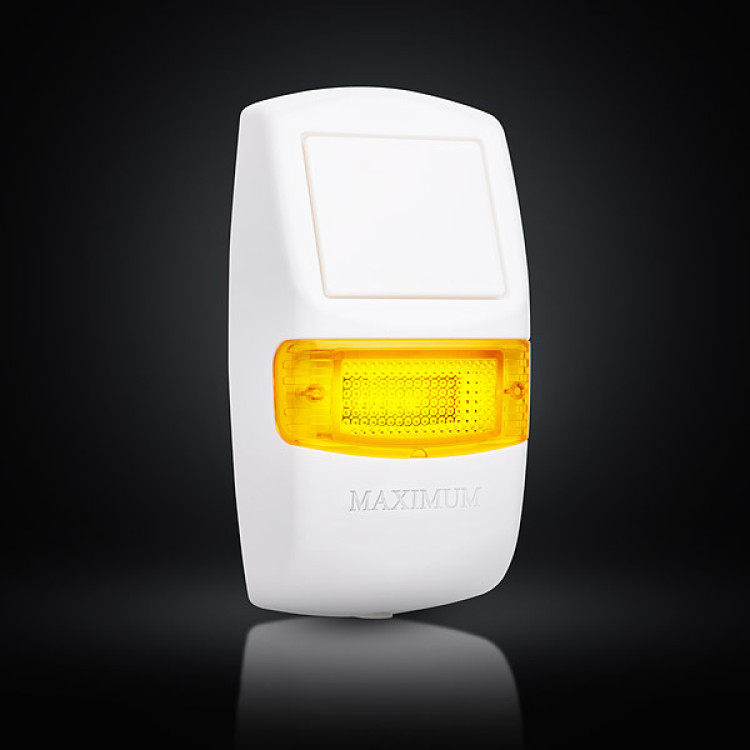

M4-SIREN - LORA wireless outdoor siren
- Manufacturer: MAXIMUM
- Item code: M4-SIREN
- Availability: In Stock
- Warranty: 2 years
- Categories: Smart Alarm System > Wireless Devices > Sensor > Siren, Sounder

-
€104.90 Ex Tax: €85.28
The Trikdis M4-SIREN is an outdoor wireless siren that we offer for installation in your security system alongside the Trikdis FLEXi SP3 alarm center. The connection between the two devices is ensured by the Trikdis RF-LORA transmitter-receiver.
The siren utilizes LoRa radio technology (Long Range), which, under suitable conditions, can provide a communication range of up to 250 meters.
Bidirectional operation, ensuring that the siren receives acknowledgment for each transmission.
Offers 4 selectable siren sounds.
Optional wired or battery power supply.
Automatic low battery level notification.
Up to 5 years of battery life.

About LoRa technology in general
LoRa devices are revolutionizing the Internet of Things (IoT) by enabling data communication over longer distances than usual while consuming very little energy. LoRa is ideal for applications that transmit small amounts of data at low bit rates, and the data can be transmitted over longer distances than WiFi, Bluetooth, or ZigBee. It is also an ideal choice in places where the mobile network is too expensive and Wi-Fi coverage is not available.
LoRa is already widely used in street lighting, parking, buildings, smart metering and fleet management. The LoRa solution provides an intelligent sensor and control security system that allows connected devices to be easily controlled and receive messages in order to make intelligent decisions about the services offered.
Trikdis chose LoRa communication technology because it allows messages to be transmitted over much greater distances than traditional wireless networks. In many cases, this can significantly reduce the cost of building a complex smart security system due to infrastructure investments, battery replacement and overall operational costs. Such a solution allows devices or sensors to be connected at a distance of up to 1-5 kilometers, sometimes even further. This technology also passes through obstacles more easily than traditional radio communication, so it confidently transmits the signal over thick concrete walls or even on the ground, naturally with some loss of distance.
Advantages of LoRa technology:
- Low cost installation and operation
- Flexible deployment model
- End-to-end security
- Low power consumption, longer battery life
- High coverage for IoT where speed and latency are not critical factors
- Long range that penetrates obstacles more easily
Technical data
Related Products


Tags
Frequently asked questions
A Security panel or Control panel is the primary controller and supervisor of a security system.
Hopefully not. Basically, the phone should be protected from any access by using a password or pattern or fingerprint. In addition, you can use password request when you start the Protegus application and also when you want remotely control something.
Yes: Protegus 2 can be tried on a live demo system, without installation or purchase — from a browser and from the mobile app too. This lets you see in advance what arming, notifications, and system status look like on a working alarm system.
Protegus 2 typically retains the event list for up to two months; with a large volume of events, this period may shorten to as little as one month.
This is how the iPhone works: while an app is open, it does not receive notifications, neither sound nor vibration.
For Protegus 2 to alert you with sound and vibration, the app has to be closed. It can stay among the recently used apps, that is not a problem. But if it is fully open and you are looking at it, no notification arrives, and you only see the event in the app.
This applies to every device: the iPhone or iPad on which Protegus 2 is currently open will not alert, the others will.
Log out of your Protegus 2 account, then log back in. The app then sets the notification values again, and in most cases this solves the problem.
In addition:
- Always keep the app updated to the latest version.
- In the app's Notifications menu, switch on the “Play notifications in DND mode” slider. This way the notification plays a sound even when the phone is in Do Not Disturb (DND) mode.
On an iPhone, an open app does not receive notifications, see: Why does Protegus 2 not play a sound or vibrate on an iPhone while the app is open?