
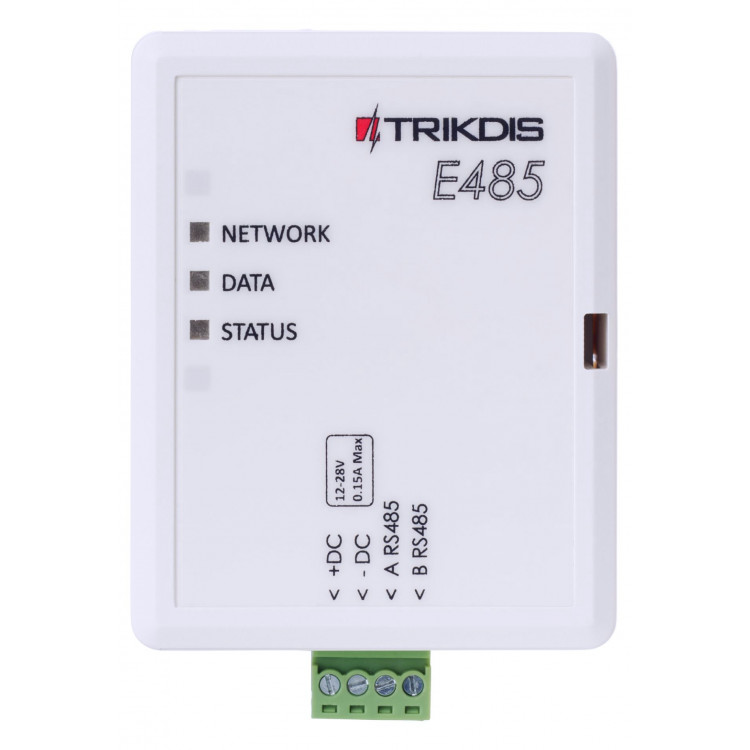
Trikdis E485 Ethernet module (RS485)
- Manufacturer: Trikdis
- Item code: E485
- Availability: In Stock
- Warranty: 2 years
- Categories: Alarm Communicator > Dual-path Redundant Communicator > Expander Module

-
€53.90 Ex Tax: €43.82
The Trikdis E485 Ethernet module enhances Trikdis smart communicators by adding a wired internet communication channel. For certain devices, it can even serve as the primary communication path, ensuring that remote control of the alarm system and event notifications are delivered through a stable wired internet connection.
For the GSM / IP-based GV17 gate controller and the G16 / G16T communicators, this means that all control and event handling is performed through the E485 as long as the wired internet connection is available, reducing reliance on SIM card data traffic.
It also supports the Trikdis SP231 alarm control panel and the T16 wireless communicator, taking over message transmission for these devices.
Like all Trikdis smart devices, the E485 communicates simultaneously with both the monitoring station and the user via the Protegus 2 mobile and web application, providing real-time notifications about alarm system events.
Main features:
- Communication over wired internet
- Notifications in the Protegus 2 application
- Free Protegus 2 server – no Fixed IP or DynDNS required
- Contact ID message forwarding to the monitoring station over IP
- Automatic failover to a secondary channel
- Automatic return after internet outage
Communication
Compatible devices
Users
Technical data
Related Products

Related Articles
Product Launch – Trikdis W485 WiFi RS485 Module
- 30/01/2019
The W485 WiFi module provides a redundant communication channel alongside Trikdis GSM communicators via RS485 connection.
Read MoreTags
Frequently asked questions
Traditionally via telephone line (TIP/RING) — a universal solution that lets devices communicate regardless of brand. Trikdis's own development means that panels on the supported list (and only those) can also be connected directly and digitally via serial port or data cable — as far as we know, no one else offers this, backed by 10-15 years of development.
Protegus 2 is the 2nd generation of Trikdis's cloud app: control your alarm system from your phone and get instant notifications. We recommend it for every current internet-connected Trikdis device. The user app is free; the paid, usage- (customer-) based tier is for monitoring stations, installers and companies.
Check the product page of any direct-connection communicator — e.g. E16, G16, GT, GT+, GET: if your panel's model is on the supported list, we strongly recommend that one. In every other case, choose the telephone-line (TIP/RING) version. Pick the communication type (4G / Ethernet) based on what's available on site.
Two parallel communication channels (e.g. Ethernet + 4G): if one drops, the other automatically takes over signalling. This gives the highest reliability, which standards may even require (a higher Grade rating). The GET and FLEXi SP3 work this way. An add-on module also exists for existing communicators, in WiFi (W485) and Ethernet (E485) versions.
Yes, using the TrikdisConfig programming software (via USB or remotely). The latest firmware is recommended for the best compatibility and security.
Yes: Protegus 2 can be tried on a live demo system, without installation or purchase — from a browser and from the mobile app too. This lets you see in advance what arming, notifications, and system status look like on a working alarm system.
Protegus 2 typically retains the event list for up to two months; with a large volume of events, this period may shorten to as little as one month.
The AUX power output of the Paradox SP4000 alarm panel has limited load capacity. In certain cases — whether using a dedicated or a universal TRIKDIS communicator — the communicator's current draw can place too much load on the AUX output. As a result, the communicator may become unstable, restart, or fail to operate correctly.
Experience shows that the problem is usually solved by powering the TRIKDIS communicator directly from the alarm panel's battery terminals (+/-) instead of from the AUX output. This provides a stable power supply and eliminates the restart or operational issues.
Note: Before changing the wiring, always check that the system complies with the manufacturer's specifications and that the total load on the power supply does not exceed the permitted value.
The Trikdis communicator reads the codes from the panel at start-up, so it only knows the codes that existed at that moment. If codes are changed in the Paradox panel, the Trikdis device must be restarted — for example by disconnecting and reconnecting its terminal block.
After restarting, the device reads the current codes and the new code works in the app as well.
Not for Paradox devices: Paradox's own tools, e.g. Babyware, IP150, IP180, work with a locked serial port as well. Unlocking the serial port is only needed when connecting a third-party device — such as a Trikdis communicator.
Yes. On the DSC data bus the Trikdis device plays a mostly passive, listening role. If many other devices communicate on the bus — typically keypads and expander modules — the Trikdis device may not “get a word in”: it may fail to read system data and may be unable to send control commands (such as partition arming).
The issue does not occur in every installation, but above 3–4 keypads or expander modules the likelihood increases — worth considering during the site survey.
For such cases we recommend the universal version that connects to the phone-line (TIP/RING) input: the E16T or the G16T. On the GT, GT+ and GET the connection mode can be switched inside the device, so where possible we recommend these for such installations.
For decades, alarm panels reported events to the monitoring station over the fixed telephone network: the telephone dialler built into the panel “made calls” in a standard format — typically Contact ID (CID). It became such a universal standard that the TIP/RING connection is still present in almost every panel from every manufacturer, including the newest ones.
The fixed telephone line is disappearing, but the connector has found a new life: a modern communicator (such as the Trikdis E16T or G16T), wired to the TIP/RING terminals, “presents” a telephone line to the panel — providing line voltage and a dial tone. The panel believes it is calling the monitoring station; in reality the communicator answers the call, decodes the Contact ID message and forwards the event over the internet or the mobile network to the monitoring station and the Protegus 2 app.
The great advantage of this solution is brand independence: it works with practically any panel — even decades old — that has a telephone dialler, with no direct bus or serial integration. That is why we call this type of device a universal communicator.
Take the card out, put it in a phone, turn off every other internet source and open an article on a news site. If it loads, the card has working data — then note the APN and switch the PIN request off.
A regularly recurring problem: during installation you want to create the system in Protegus 2, but you get the message that the device is offline. In that case it is best to rule out the SIM card and the data connection first — it takes a few minutes with a phone.
Checking the SIM card with a phone
- Remove the SIM card from the device and insert it into a phone.
- Turn off every other source of internet connection so that the SIM card in question can be tested undisturbed: Wi-Fi, on a dual-SIM phone the other SIM card as well, or anything else — this way the traffic certainly goes through the card being examined.
- Turn on mobile data.
- Open a website in the browser, for example a news site, and open an article inside it too. If the article loads as well, the data connection on the card works. (A home page you opened earlier may come from the phone's cache — that is why an article must also be opened.)
If there is no internet connection, find out why: an incorrect or missing APN setting, no subscription on the card, an exhausted or expired data allowance, etc. Once that is sorted out and the connection really works, continue with step 5. - In the phone's settings check which APN belongs to this SIM card and write it down.
- Recommendation: turn off the PIN code request on the SIM card. A PIN code can of course be used and it does add security, but in devices like these we generally do not recommend it, and it is not needed for operation.
Back into the device
- Take the SIM card out of the phone and put it back into the Trikdis device.
- Using TrikdisConfig, enter the device's programming and set the APN you wrote down in the APN setting.
- Write the changes to the device, then check whether the data connection is restored — that is, whether the device is online in Protegus 2.
If it works in the phone but not in the device
The problem is almost certainly the PIN code or the APN. If the device sees the network but no connection to the server is established, check the APN first — an empty or mistyped APN is the typical symptom.
If the device picks up several networks and switches between them, it is worth setting a preferred operator. See: Setting a preferred operator – MCC and MNC codes (Europe).