
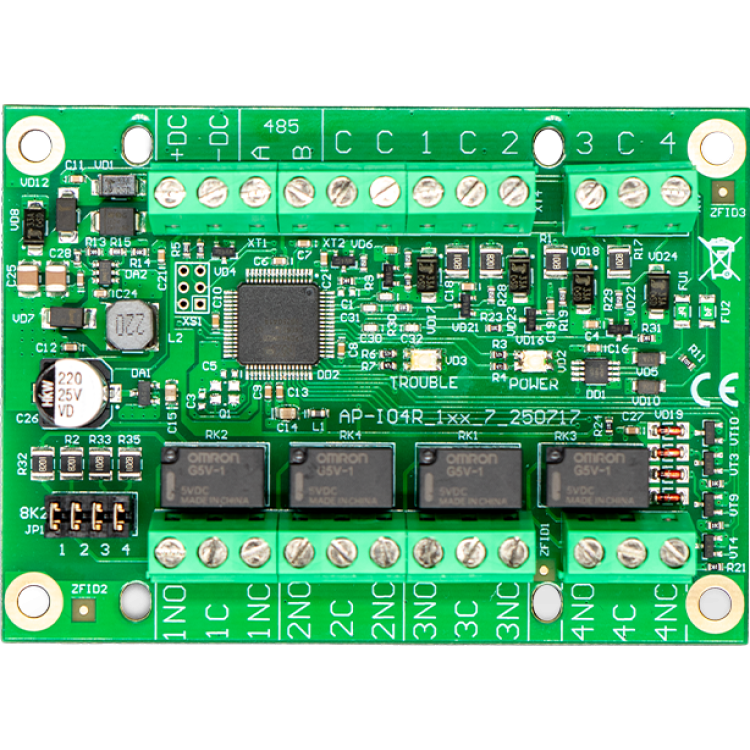
Trikdis IO4R (IO-4R) – GATOR I/O Expander Module (4 Inputs / 4 Relays)
- Manufacturer: Trikdis
- Item code: IO4R
- Availability: Out of Stock
- Warranty: 2 years
- Categories: Smart Alarm System > Accessories > Expander Module

-
€72.90 Ex Tax: €59.27
The Trikdis IO4R is an expansion module designed specifically for GATOR gate controllers, adding 4 inputs and 4 relay outputs to extend system functionality. It is an ideal choice for flexible control and state monitoring in gate automation systems.
Key Features
- 4 inputs and 4 relay outputs in a single module
- EOL (8.2 kΩ) input monitoring for reliable operation
- Relay outputs with NC/NO contacts
- RS485 communication for GATOR systems
- Remote control and system intervention capability
- Fast diagnostics with LED indicators
Inputs
The inputs support 8.2 kΩ EOL (End-of-Line) configuration, providing stable and reliable state monitoring. They are suitable for safety sensors, limit switches, or external control signals. The input voltage range spans from 0 V up to supply voltage, ensuring compatibility with various gate system components.
Relay Outputs
The 4 relay outputs feature NC/NO contacts, making them suitable for switching a variety of devices. They can be used for gate triggering, system reset, or implementing bypass logic. Switching capacity is up to 125 V / 1 A (30 V DC).
An optional 8.2 kΩ output resistor configuration is also available for monitored output scenarios.
GATOR System Integration
The IO4R connects to GATOR gate controllers via RS485 communication, ensuring stable and real-time data exchange. The module operates as a native extension of the GATOR system, providing immediate response to input events and remote commands.
Ideal for installations requiring additional control points, automation logic, or remote intervention capability.
Remote Control and Bypass Function
The module enables remote execution of critical actions, including temporary bypass of safety sensors. This is particularly useful in fault situations where system operation must be restored quickly without an on-site visit.
Status Indication and Diagnostics
Built-in LEDs support fast troubleshooting:
- POWER LED – supply voltage status (normal / low)
- TROUBLE LED – RS485 communication fault
- Input and output state indication
Installation
The compact design allows easy integration into gate automation enclosures. Connection is made via power supply, RS485 bus, and input and relay output terminals.
Suitable for both new installations and upgrades to existing systems.
Related Products
Tags
Frequently asked questions
A Security panel or Control panel is the primary controller and supervisor of a security system.
Hopefully not. Basically, the phone should be protected from any access by using a password or pattern or fingerprint. In addition, you can use password request when you start the Protegus application and also when you want remotely control something.
Protegus 2 is the 2nd generation of Trikdis's cloud app: control your alarm system from your phone and get instant notifications. We recommend it for every current internet-connected Trikdis device. The user app is free; the paid, usage- (customer-) based tier is for monitoring stations, installers and companies.
Yes, using the TrikdisConfig programming software (via USB or remotely). The latest firmware is recommended for the best compatibility and security.
Yes: Protegus 2 can be tried on a live demo system, without installation or purchase — from a browser and from the mobile app too. This lets you see in advance what arming, notifications, and system status look like on a working alarm system.
Protegus 2 typically retains the event list for up to two months; with a large volume of events, this period may shorten to as little as one month.
The AUX power output of the Paradox SP4000 alarm panel has limited load capacity. In certain cases — whether using a dedicated or a universal TRIKDIS communicator — the communicator's current draw can place too much load on the AUX output. As a result, the communicator may become unstable, restart, or fail to operate correctly.
Experience shows that the problem is usually solved by powering the TRIKDIS communicator directly from the alarm panel's battery terminals (+/-) instead of from the AUX output. This provides a stable power supply and eliminates the restart or operational issues.
Note: Before changing the wiring, always check that the system complies with the manufacturer's specifications and that the total load on the power supply does not exceed the permitted value.