

One application for all Trikdis devices


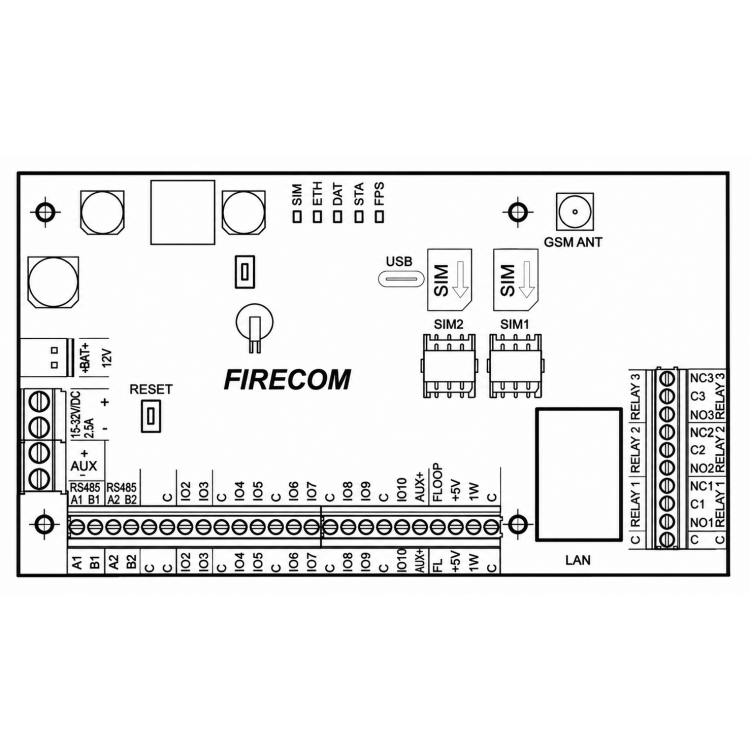
Trikdis FireCom Ethernet + 4G fire communicator
- Manufacturer: Trikdis
- Item code: FireCom
- Availability: Ordered upon request
- Warranty: 2 years
- Categories: Alarm Communicator > Fire Communicator > Dual-path Redundant Communicator

-
€321.90 Ex Tax: €261.71
Communication
Technical data
The Trikdis FireCom is an innovative, flexible, and versatile fire communicator. This advanced device ensures fast, reliable, and secure event transmission via Ethernet and/or a 4G mobile network using two SIM cards. FireCom is a cost-effective and efficient solution that guarantees uninterrupted communication and operation. With its EN54 certification, the device fully complies with the strictest European fire safety regulations.
Main Features
Professional event reporting to monitoring centers
- Reliable data transmission via Ethernet or 4G mobile network, with support for two SIM cards
- Automatic channel switching in case of network failure
- Redundant dual-path communication with flexible configuration options
- Event transmission in Contact ID or SIA format
- Reporting to two independent monitoring stations, each with its own backup receiver
User-friendly notification system
- Notification of up to 8 preconfigured phone numbers
- Event alerts via SMS and push notifications
- Special sound and visual alerts in the Protegus 2 app
- Remote temperature monitoring with alerts when threshold is exceeded
Remote control of outputs
- Interactive control via the Protegus 2 mobile app
- Send commands via SMS or phone call
- Automated operation based on predefined rules
Quick setup and easy installation
- Plug & Play configuration, minimal installation time
- Configuration via USB cable or remotely using TrikdisConfig software
- Support for automatic remote firmware updates
- Two access levels: installer and administrator
Flexible inputs and outputs
- 3 high-power relay outputs (1A, 30V DC)
- Special “FLOOP” input for connecting two-wire fire detectors
- 10 configurable I/O terminals, usable as inputs (IN) or outputs (OUT)
- Available input types: NC, NO, EOL, EOL-T, ATZ, ATZ-T
- Expandable to 32 inputs and 16 outputs using iO modules
- RS485 bus support for iO expansion modules
Communication
To Protegus cloud, to iOS/Android Protegus mobile apps
To 8 mobile phones via SMS messages
Calls to 8 phone numbers
4G (LTE)
SMS
call
Compatible devices
Contacts (inputs and outputs)
Programming
Users
Technical data
EN 54-4:1997/AC:1999/A1:2002/A2:2006
1922-CPR-2083
Related Products
Related Articles

Expanded system information page in Protegus 2
- 17/06/2026
The Protegus 2 system information page now shows more technical data for FLEXi SP3 and FireCOM systems - all in one place.
Read More
FireCom fire communicator – installation and programming manual
- 02/11/2026
Installation and programming manual for the Trikdis FireCom Ethernet and 4G fire communicator (EN 54-21, EN 54-4): power supply and battery, connection to the fire alarm control panel's outputs or RS485 bus (ESPA 4.4.4, NSC Solution, INIM Smartline, C-TEC Cast ZFP, Polon-Alfa 3000), setup in TrikdisConfig, monitoring station, Protegus 2, control by SMS and call.
Read MoreTags
Frequently asked questions
Protegus 2 is the 2nd generation of Trikdis's cloud app: control your alarm system from your phone and get instant notifications. We recommend it for every current internet-connected Trikdis device. The user app is free; the paid, usage- (customer-) based tier is for monitoring stations, installers and companies.
Two parallel communication channels (e.g. Ethernet + 4G): if one drops, the other automatically takes over signalling. This gives the highest reliability, which standards may even require (a higher Grade rating). The GET and FLEXi SP3 work this way. An add-on module also exists for existing communicators, in WiFi (W485) and Ethernet (E485) versions.
Yes, using the TrikdisConfig programming software (via USB or remotely). The latest firmware is recommended for the best compatibility and security.
With the G17F fire communicator, any fire alarm unit or panel can be extended with mobile-network event transmission: when a fire alarm triggers, the event is forwarded to the configured destinations — for example, the fire brigade or a monitoring station — and the owner is also notified in the Protegus 2 app. It handles two parallel communication channels, each with its own backup channel.
Where the fire alarm system requires standard-compliant, certified signalling, an EN54-certified device is needed: such as the Trikdis FireCom, which communicates over Ethernet and/or two-SIM 4G mobile network, and meets the strictest European fire safety requirements.
Yes: Protegus 2 can be tried on a live demo system, without installation or purchase — from a browser and from the mobile app too. This lets you see in advance what arming, notifications, and system status look like on a working alarm system.
Protegus 2 typically retains the event list for up to two months; with a large volume of events, this period may shorten to as little as one month.
Take the card out, put it in a phone, turn off every other internet source and open an article on a news site. If it loads, the card has working data — then note the APN and switch the PIN request off.
A regularly recurring problem: during installation you want to create the system in Protegus 2, but you get the message that the device is offline. In that case it is best to rule out the SIM card and the data connection first — it takes a few minutes with a phone.
Checking the SIM card with a phone
- Remove the SIM card from the device and insert it into a phone.
- Turn off every other source of internet connection so that the SIM card in question can be tested undisturbed: Wi-Fi, on a dual-SIM phone the other SIM card as well, or anything else — this way the traffic certainly goes through the card being examined.
- Turn on mobile data.
- Open a website in the browser, for example a news site, and open an article inside it too. If the article loads as well, the data connection on the card works. (A home page you opened earlier may come from the phone's cache — that is why an article must also be opened.)
If there is no internet connection, find out why: an incorrect or missing APN setting, no subscription on the card, an exhausted or expired data allowance, etc. Once that is sorted out and the connection really works, continue with step 5. - In the phone's settings check which APN belongs to this SIM card and write it down.
- Recommendation: turn off the PIN code request on the SIM card. A PIN code can of course be used and it does add security, but in devices like these we generally do not recommend it, and it is not needed for operation.
Back into the device
- Take the SIM card out of the phone and put it back into the Trikdis device.
- Using TrikdisConfig, enter the device's programming and set the APN you wrote down in the APN setting.
- Write the changes to the device, then check whether the data connection is restored — that is, whether the device is online in Protegus 2.
If it works in the phone but not in the device
The problem is almost certainly the PIN code or the APN. If the device sees the network but no connection to the server is established, check the APN first — an empty or mistyped APN is the typical symptom.
If the device picks up several networks and switches between them, it is worth setting a preferred operator. See: Setting a preferred operator – MCC and MNC codes (Europe).